
Quickly obtain BibTeX
Paste arXiv IDs, arXiv URLs, Journal links or titles — QuickBib detects them and resolves the DOI automatically. See examples.
QuickBib is a cross-platform utility that uses doi2bib3 to fetch BibTeX for DOIs, arXiv identifiers as well as article titles. Works as a GUI app and also as a CLI. Perfect for research workflows, manuscripts and automation.
Install on GNU/Linux Download for Windows Run on macOS Open Web App
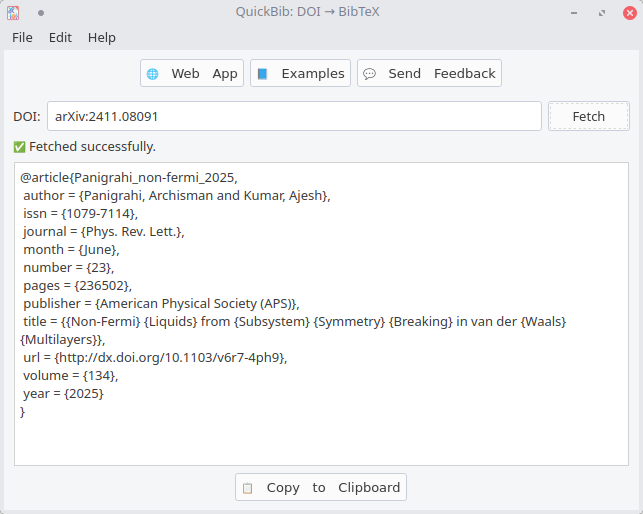
Designed for researchers, writers and automation — QuickBib makes fetching and normalizing BibTeX simple.
Paste arXiv IDs, arXiv URLs, Journal links or titles — QuickBib detects them and resolves the DOI automatically. See examples.
Use QuickBib on GNU/Linux, Windows, macOS or mobile devices: install from packages, grab a release or try the web app.
QuickBib is free and open source software (FOSS) licensed under GPLv3. The source is available on GitHub
Use the GUI app for quick lookups or integrate into scripts via the CLI and programmatic API.

Choose the option that fits your platform.
You can install QuickBib from Flathub or the Snap Store on any distro:

Run these commands one by one in a terminal to install QuickBib.
First, add the PPA:sudo add-apt-repository ppa:apandada1/quickbibsudo apt updatesudo apt install quickbibFollow the instructions in the "Run from source" section below to clone the repository and run QuickBib from source. You can also use meson to install it.
QuickBib is available on Microsoft Store.

Open Windows Terminal/Powershell and run
winget install -e --id archisman-panigrahi.QuickBibMoreover, traditional .exe installers for Windows are available: Download from GitHub
It is recommended to use the Web App on macOS. Continue reading to learn why.
No prebuilt macOS installers: Distributing an app that users can graphically install and run seems to require paying Apple perpetually (US$99/year) to sign and notarize the app even if the app is free — that’s plain extortion — so we ship the source instead. You can run QuickBib from source or build a macOS app using the packaging scripts on GitHub. Pull requests and heroic ideas for a user friendly installer are very welcome.
Alternatively, here is how to run from source (on macOS as well as GNU/Linux).
QuickBib is accessible on mobile devices via the web app — open it in a browser on your phone or tablet: QuickBib Web App.
QuickBib accepts common identifiers and links — DOIs, DOI URLs, arXiv IDs/URLs, journal article URLs as well as their titles. Below are examples of supported inputs and how you might use them programmatically.
It can work with all the following:
10.1038/nphys1170https://doi.org/10.1038/nphys1170https://arxiv.org/abs/2411.08091arxiv:2411.08091 or arXiv:2411.08091 or 2411.08091hep-th/9901001https://journals.aps.org/prl/abstract/10.1103/v6r7-4ph9Projected Topological Branes (supports fuzzy search!)The command-line backend doi2bib3 supports the same input types and is useful for programmatic usage and automation.
Yes! QuickBib is a free software (free as in freedom, as well as gratis) according to the Free Software Foundation's definition: What is free software? (FSF). It is free to download, use, redistribute, and modify under the terms of the GPLv3.
QuickBib and doi2bib3 are distributed under the GNU General Public License v3 (GPL-3.0-only).
Feature requests, bug reports, and pull requests are welcome — please open an issue or submit a PR on the QuickBib GitHub repository. Contributions help improve QuickBib for everyone.
Yes! You can use doi2bib3. Install it with pip3 install --user doi2bib3. It supports the same input arguments as QuickBib, but also provides python API and it can also export BibTeX entries to a .bib file.